Quick Start
Get started with qpx in minutes - from installation to your first data conversion.
Quick Start Flow
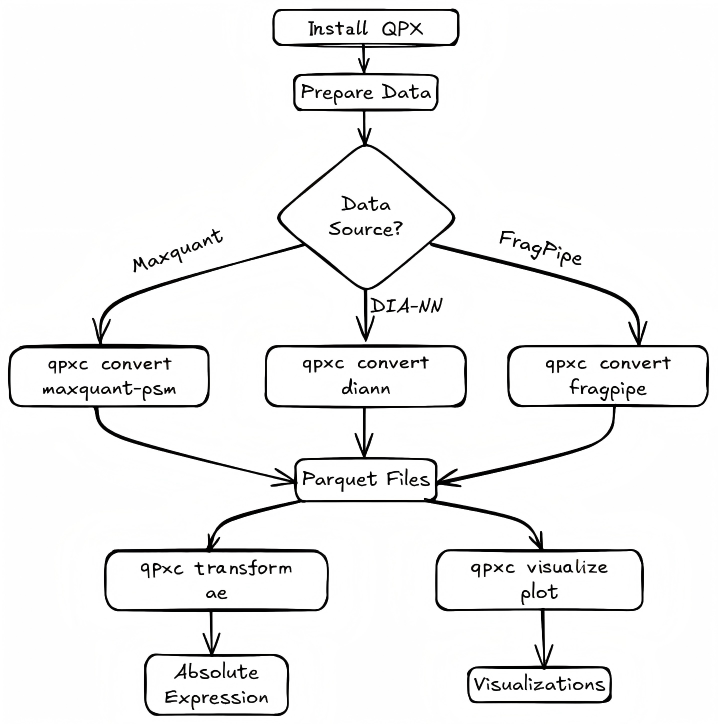
Prerequisites
Before installing qpx, ensure you have:
- Python 3.10 or higher - Check with
python --version - pip - Python package manager (included with Python)
- Optional: conda/mamba for environment management
Installation
Verify Installation
After installation, verify qpx is working correctly:
You should see output similar to:
Usage: qpxc [OPTIONS] COMMAND [ARGS]...

  qpxc -- quantitative proteomics data format tools.

Options:
  --version   Show the version and exit.
  -h, --help  Show this message and exit.

Commands:
  convert    Convert external tool outputs to QPX format.
  info       Show information about a QPX dataset.
  ontology   Manage CV ontology data (PSI-MS, PRIDE CV).
  query      Query and inspect QPX datasets.
  transform  Transform QPX data into derived representations.
  validate   Validate a QPX dataset or structure against the canonical...
Your First Conversion
Let's convert some sample MaxQuant data to QPX format.
Step 1: Download Sample Data
# Create a working directory
mkdir qpx-tutorial && cd qpx-tutorial

# Download sample MaxQuant msms.txt file
curl -L -o msms.txt \
  "https://raw.githubusercontent.com/bigbio/qpx/main/tests/examples/maxquant/maxquant_simple/msms.txt"
Step 2: Convert to QPX Format
# Convert MaxQuant PSM data to QPX parquet format
qpxc convert maxquant \
    --msms-file msms.txt \
    --output-folder ./output \
    --structures psm \
    --verbose
Step 3: Verify the Output
Step 4: Inspect the Data (Optional)
# Using Python to read the parquet file
import pyarrow.parquet as pq

table = pq.read_table("output/psm-*.psm.parquet")
df = table.to_pandas()

print(f"Total PSMs: {len(df)}")
print(f"Columns: {list(df.columns)}")
print(df.head())
What's Next?
Now that you've completed your first conversion, explore more:
| Next Step | Description |
|---|---|
| Examples Overview | More conversion and analysis examples |
| Convert Commands | All available data converters |
| Transform Commands | Data transformation tools |
| Format Specification | Understanding QPX data formats |
Common Commands
# Convert DIA-NN data
qpxc convert diann --report-path report.tsv --sdrf-file data.sdrf.tsv --output-folder ./output

# Convert FragPipe data
qpxc convert fragpipe --psm-file psm.tsv --output-folder ./output

# Validate a QPX dataset
qpxc validate --dataset-folder ./output

# Query a QPX dataset
qpxc query --dataset-folder ./output --sql "SELECT * FROM psm LIMIT 10"
Need Help?
- Run
qpxc <command> --helpfor detailed command help - Check the Troubleshooting guide
- Visit our GitHub Issues for support